How to create a Login form in C#


  1. Create a "Windows Forms Application" project
  2. Add a new form. By default, it will have a name of "Form2"
  3. Add 2 labels, 2 textboxes, and 2 buttons like the one shown below:
  4. open the first form (Form1) and double click on the empty space. This should show the Form1_Load event. Declare an instance of Form2 and display it. (Use ShowDialog instead of Show).
  5. Open the second form (Form2) and view the properties of the second textfield (password text box). Specify * in the PasswordChar attribute. 
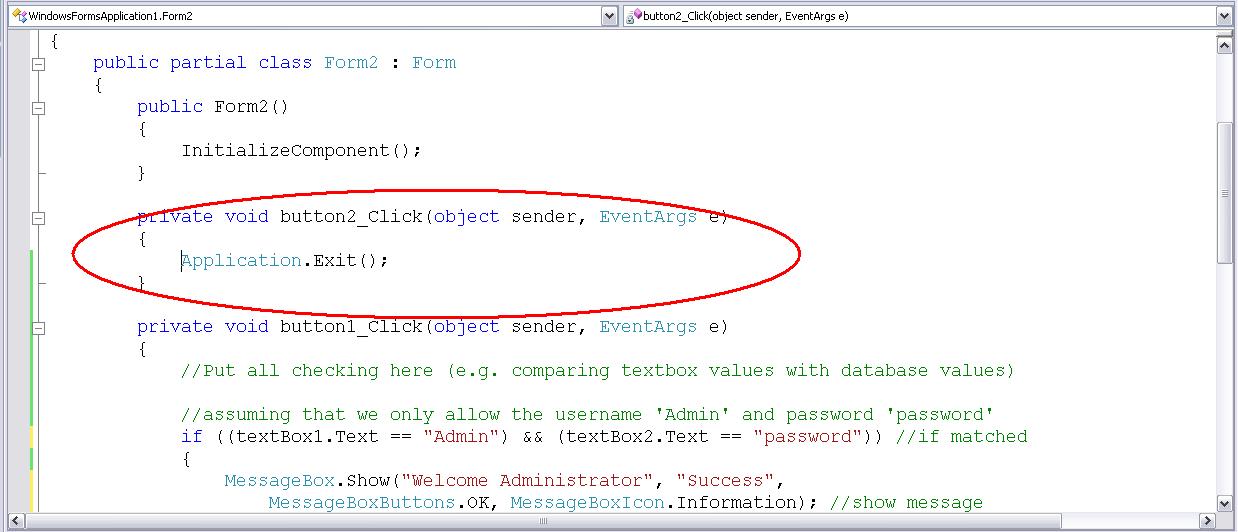
  6. Double click on the Login button. This will show the button1_click event. Put all necessary checking here like the one shown.

    **You can change the checking part to comparing the values with your database. For example:
    OleDbConnection cn = new OleDbConnection("YourConnectionString");
    cn.Open();
    DataTable dt = new DataTable();
    OleDbCommand cmd = new OleDbCommand("select * from usertable where username='"+textBox1.Text+"' and password='" + textBox2.Text+"'",cn);
    OleDbDataAdapter da = new OleDbDataAdapter(cmd);
    da.Fill(dt);
    if(dt.Rows.Count>0){
         MessageBox.Show("Welcome!");
    }
    else{
         MessageBox.Show("Incorrect Username or Password");
    }


  7. Go back to the form view of Form2 and double click on the Cancel button. The cancel button should close the application.
  8. Open Form2 again and view its properties and change the Startup Position attribute

Comments

Anonymous said…
how can i move from the center to the left the title of the form?
Anonymous said…
how to move through the left the title of the form?
Unknown said…
Each time you call the Aplication; you are calling the login form again!

Popular posts from this blog

Using Crystal Reports 10 with C#.net and Firebird

C# express doesn't include a report designer or viewer. Reports however, is very much needed when creating a business software. Since C# express doesn't include a report designer, we need to find other means. One is to use a free report such as MyNeoReport. This however may not work under many circumstances. The other alternative would be to use a proven report engine and designer-Crystal Report. Crystal Report has been used by many developers (in our city). However, using a free programming language and IDE, and a free database is very limiting. Not much information can be gathered on the net either (with regards to reporting as of this writing). Here's a way to use Crystal Reports using Firebird database and C# Express as software development IDE: Pre-requisites: C# Express 2005 EMS SQL Manager 2005 for InterBase & Firebird Lite Crystal Reports 10 Create the following database: Name: TestDB1 Tables: TESTTABLE1 Columns:  ID - PK, INTEGER,AUTOINCREMENT DES...

Number to Text in Excel

I was asked today by one of my classmates about converting numeric values to literal values in excel. I thought there was a function for this but I found none. Well I was curious so I looked it up on the web . I've done a little modification here to make it more or less generic (specially when writing in checks). Here's how it's done: Click Tools->Macro->Visual Basic Editor Insert a module Paste the following code: Option Explicit '**************** ' Main Function * '**************** Function SpellNumber(ByVal MyNumber) Dim Temp, WholeNumberText, DecimalText Dim DecimalPlace, Count ReDim Place(9) As String Place(2) = " Thousand " Place(3) = " Million " Place(4) = " Billion " Place(5) = " Trillion " ' String representation of amount. MyNumber = Trim(Str(MyNumber)) ' Position of decimal pl...

Using Firebird with ASP.net

In my previous post , I was able to connect a firebird 2.0 database to asp.net using controls. The next goal was to connect to a firebird database using the firebird.net engine and using the repeater control. I however, was able to use the firebird.net engine to connect to the firebird database but not to the repeater control. I used the html table tag. I've created a simple asp.net demo displaying the contents of a firebird database on page load. Here are the steps: 1. Things Needed: Firebird 2.0 Server Firebird 2.0 Client Visual Web Developer 2. In Visual Web Developer, create a new ASP.net Website (using C# as the programming language). The project will have a default page named Default.aspx. Make sure that the code is separate from the page (ex. Default.aspx.cs is separate from Default.aspx) 3. On the Website menu, click on Add Reference. 4. Select the Firebird - ADO.net 2.0 Data Provider and click Ok. 5. Add using FirebirdSql.Data.FirebirdClient; to the "using" sec...