
Using MySQL with Visual Basic .Net

Before you use this code, here are my assumptions:
  1. You have background on database management system
  2. You know how to create a database in mysql
  3. You know how to add tables to the database
  4. You are familiar with Visual Basic .Net
Things needed/installed:
  1. MySQL Connector
  2. Microsoft Visual Basic Express 2008 (Since this is what I'm using right now. You can use Visual Basic Express 2005 or the full version included in the Microsoft Visual Studio Package)
  3. MySQL Editor (I'm using WAMP's phpMyAdmin)

Things to do:
  1. Create a database in MySQL with at least 1 table. I'm using the following in this sample:
Database Name: Contacts
Table Name: ContactInformation
Fields: Id (int, autoIncrement), Name (varchar(64)), ContactNumber (varchar(20))

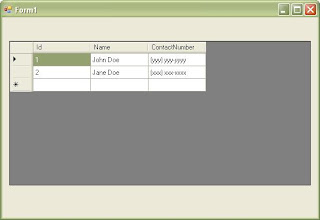
Sample Contents:
Full Texts Id Name ContactNumber
Edit Delete 1 John Doe (yyy) yyy-yyyy
Edit Delete 2 Jane Doe (xxx) xxx-xxxx


Visual Basic .Net Code
  1. Create a new Visual Basic Windows Forms Application.
  2. Add a DataGridView to the form
  3. On the code view, overwrite the code with the following:
Imports System.Data.Odbc

Public Class Form1
Private cn As OdbcConnection
Private adp As OdbcDataAdapter
Private dt As DataTable

Private Sub Form1_Load(ByVal sender As System.Object, B
yVal e As System.EventArgs) Handles MyBase.Load
cn = New OdbcConnection("Driver={MySQL ODBC 3.51 Driver};Server=localhost;Database=Contacts; User=root;Password=;Option=3;")
Call cn.Open()
adp = New OdbcDataAdapter("select * from ContactInformation", cn)
dt = New DataTable()
Call adp.Fill(dt)
DataGridView1.DataSource = dt
End Sub
End Class

Comments

Popular posts from this blog

Using Crystal Reports 10 with C#.net and Firebird

C# express doesn't include a report designer or viewer. Reports however, is very much needed when creating a business software. Since C# express doesn't include a report designer, we need to find other means. One is to use a free report such as MyNeoReport. This however may not work under many circumstances. The other alternative would be to use a proven report engine and designer-Crystal Report. Crystal Report has been used by many developers (in our city). However, using a free programming language and IDE, and a free database is very limiting. Not much information can be gathered on the net either (with regards to reporting as of this writing). Here's a way to use Crystal Reports using Firebird database and C# Express as software development IDE: Pre-requisites: C# Express 2005 EMS SQL Manager 2005 for InterBase & Firebird Lite Crystal Reports 10 Create the following database: Name: TestDB1 Tables: TESTTABLE1 Columns:  ID - PK, INTEGER,AUTOINCREMENT DES...

Adding a Footer to the DataGridView component

I have been searching for sites and forums that would give me a any hint on having a footer on the .net DataGridView control. It was frustrating. I found some, but not what I was looking for. I use windows forms. It would have been easier if I was into web. I decided to create one for myself. It's not complete, but it works with me. It needs improvement and I hope that some programmers who might pass through this blog will help me with it :D. Limitations: Cannot set Footer values during design time. Can sometimes hide a row when scrolled to the last item in the grid. What I did was just create a user control that inherits the DataGridView control and add a StatusStrip to act as the footer. public partial class MyDataGridView : DataGridView { public StatusStrip Footer { get { return (StatusStrip)this.Controls["Footer"]; } } private bool _footerVisible; [Browsable(false)] /// /// Sets or Gets the va...

Using Firebird with ASP.net

In my previous post , I was able to connect a firebird 2.0 database to asp.net using controls. The next goal was to connect to a firebird database using the firebird.net engine and using the repeater control. I however, was able to use the firebird.net engine to connect to the firebird database but not to the repeater control. I used the html table tag. I've created a simple asp.net demo displaying the contents of a firebird database on page load. Here are the steps: 1. Things Needed: Firebird 2.0 Server Firebird 2.0 Client Visual Web Developer 2. In Visual Web Developer, create a new ASP.net Website (using C# as the programming language). The project will have a default page named Default.aspx. Make sure that the code is separate from the page (ex. Default.aspx.cs is separate from Default.aspx) 3. On the Website menu, click on Add Reference. 4. Select the Firebird - ADO.net 2.0 Data Provider and click Ok. 5. Add using FirebirdSql.Data.FirebirdClient; to the "using" sec...